
The Magic of Microcontrollers: Why You Need to Start Your Arduino Projects Today
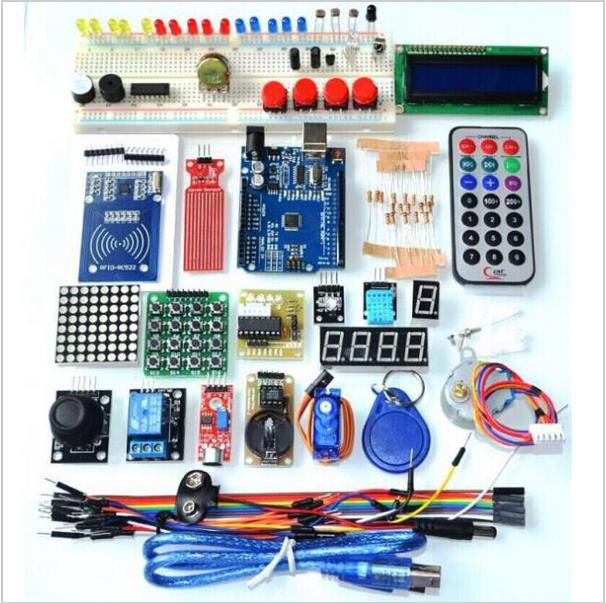
Have you ever wondered what makes your smart thermostat tick, or how a parking sensor knows exactly when to stop? The secret often lies in a tiny, powerful brain called a microcontroller. These small computers are the heart of nearly every piece of modern electronic innovation. Starting with Arduino projects is the best way to demystify this technology and unlock your inner inventor. It’s an incredibly rewarding journey that combines programming, electronics, and pure creation, making it the perfect hobby for students, teachers, and curious adults alike.
What is Arduino and Why is it the Best Starting Point?
The Arduino platform is an open-source electronics prototyping system based on easy-to-use hardware (the board) and software (the IDE). Unlike industrial microcontrollers, Arduino was specifically designed for artists, designers, and hobbyists with little or no technical experience.
The key advantage is its accessibility. The UNO R3 board is the backbone of thousands of online tutorials and communities. The programming is based on C/C++, but the IDE simplifies the coding process significantly, allowing you to focus on the logic and the circuit. If you can follow a recipe, you can build an Arduino project!
3 Fantastic Arduino Projects That Will Get You Hooked
To truly grasp the power of microcontrollers, you have to get hands-on. Here are three simple, yet deeply satisfying, Arduino projects you can build with a comprehensive starter kit.
1. Building an Intelligent Alarm System
Imagine an alarm that goes off only when a certain condition is met—say, a change in temperature or light. This project requires combining simple inputs and outputs.
- Key Components: You will need a Buzzer for sound output, an LED for visual output, and a Temperature Module or Photoresistor for input.
- What you learn: You’ll master conditional programming (if/else statements) by telling the Arduino, “IF the temperature is above 30∘C, THEN turn the LED on and sound the buzzer.”
2. Mastering Motion Control
Microcontrollers excel at controlling movement. This is a foundational skill for building robots or automated machinery.
- Key Components: The 9g Servo Motor and the Stepper Motor (with its driver board).
- What you learn: You’ll learn the difference between Servos (which move to a precise angle) and Steppers (which move in precise, controlled steps). This is crucial for robotics, 3D printing, and automated camera equipment. You can find excellent, detailed tutorials on motor control on a site like Instructables, which hosts a vast array of user-submitted DIY guides.
3. Creating a Digital Keypad Entry System
For a slightly more advanced challenge, try building a basic access control system using RFID (Radio-Frequency Identification).
- Key Components: The RFID Module, an RFID Key Fob, and the Relay Module.
- What you learn: This teaches you digital communication protocols and security logic. The RFID reader communicates with the tag, and if the tag’s unique ID matches the one in your code, the Relay can be activated to “unlock” a door (or simply turn an LED on to simulate it).
Ready to Dive In? Your Complete Starter Kit Awaits
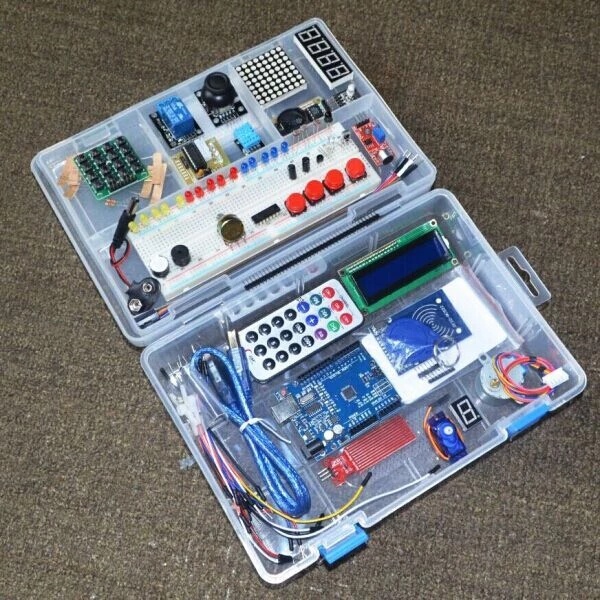
The most important step in starting your Arduino projects is having the right tools. Instead of hunting down 37 individual components, the Ultimate UNO R3 Electronics Starter Kit provides absolutely everything you need in one organized box.
This kit includes the core UNO R3 board, the breadboard, all necessary cables, and a vast collection of modules—from sensors to display units—to build every project listed above and dozens more. It’s the perfect, comprehensive resource for jump-starting your STEM education or hobby.
Don’t let curiosity remain a question. Turn it into a creation!
Click here to view the Ultimate UNO R3 Electronics Starter Kit and start building your future today.
Further Learning Resources
To continue your education and troubleshoot those tricky coding moments, check out these reputable external sites:
- Arduino Official Documentation: The official site has component references and troubleshooting guides straight from the source.
- Adafruit Learning System: Known for its high-quality, step-by-step tutorials on hundreds of electronic components and projects.
- Instructables: A huge community of DIY creators who post detailed, user-friendly guides for Arduino projects.
Leave a Reply